Monday, July 16, 2012

aspConf - Its free - its On-line -- its virtual -- its recorded

aspConf is a virtual conference focused on one thing: showcasing the ASP.NET stack as the platform for great web applications.

Subjects include:
Net4.5, Azure, ASP.NET,MVVM, LINQ, TFS, Web API ,Single Page Web Apps,Testing,Design Patterns ,MVC and WinForms, MVC 4 Mobile, HTML5,CSS3,jQuery  MVC, etc

Session list:


  • Glimpse into ASP.NET - Taking a never before seen look inside your server!  |  Nik Molnar, Anthony van der Hoorn 
  • Playing with Balls of Mud  |  Ashic Mahtab 
  • JavaScript Gotchas  |  Ashic Mahtab 
  • Understanding Monads with JavaScript  |  Ashic Mahtab 
  • ASP.NET MVC Tips, Tricks and Hidden Gems  |  Shay Friedman 
  • Introduction to KnockoutJS Single Page Applications with ASP.NET MVC4 A Smooth Transition to HTML5 Using MVVM Continuous 
  • Truly understanding async programming in ASP.NET  |  Damian Edwards 
  • Advanced ASP.NET Web API  |  Daniel Roth 
  • ASP.NET - Beyond Visual Studio 2012 and .NET 4.5  |  Scott Hunter 
  • Ask the Experts (SignalR, MVC, Web API)  |  Damian Edwards 
  • A Smooth Transition to HTML5 Using MVVM  |  Chris Bannon 
  • Bundling and Optimization  |  Howard Dierking 
  • ASP.NET MVC 4 Mobile  |  Jon Galloway 
  • Azure SDK  |  Mohit Srivastava 
  • Next Generation Visual Studio Web Tools  |  Mads Kristensen 
  • Advanced ASP.NET Web Forms 4.5  |  Damian Edwards 
  • Web Sites on Windows Azure  |  Brady Gaster 
  • Getting Started With ASP.NET MVC  |  Eric Sowell 
  • Modern Web Development  |  Shawn Wildermuth 
  • Responsive Design  |  Shawn Wildermuth 
  • HTML5 w/ ASP.NET 4 & 4.5  |  Matthew Osborn 
  • NuGet: Add Reference, Awesome  |  Matthew Osborn 
  • Reach the Mobile Masses with ASP.NET MVC 4 and jQuery Mobile  |  Keith Burnell 
  • KO Your ASP.NET MVC with Knockout  |  Keith Burnell 
  • Test Driving ASP.NET MVC  |  Keith Burnell 
  • CQRS with ASP.NET MVC - A Year On  |  Ashic Mahtab 
  • Kendo UI – Lighten Your Load by Adding a Sword  |  Keith Burnell 
  • Cryptography 101 Using the .NET Framework and ASP.NET   |  Robert Boedigheimer 
  • Improving Web Site Performance and Scalability While Saving Money  |  Robert Boedigheimer 
  • Fiddler and Your Website  |  Robert Boedigheimer 
  • Styling web pages with CSS 3  |  Robert Boedigheimer 
  • Exterminating Common jQuery Bugs  |  Elijah Manor 
  • Intro to RavenDB: NoSQL is Rapping at Your Door  |  David Neal 
  • Score a Knockout   |  John West 
  • Tame Your Static Content: Compress, Optimize, Secure & more...  |  Dan Maharry 
  • Introduction to Simple.Web  |  Mark Rendle 
  • Test-First and Functional-First with Web API  |  Ryan Riley 
  • Going Native With HTML5  |  Chris Love 
  • That's Crazy! How To Build Single Page Web Apps   |  Chris Love 
  • Enterprise Search with MVC4  |  Chander Dhall 
  • Rev up your javascript skills  |  Chander Dhall 
  • Quick Start: Test Driven Development  |  David Vujic 
  • Integration Testing With SpecsFor.Mvc – ASP.NET MVC Testing on Steroids!  |  Matt Honeycutt 
  • Persistence In The Cloud: How to use Azure Storage  |  David Giard 
  • HTML5 is the Future of the Web  |  David Giard 
  • How I Learned to Stop Worrying and Love jQuery  |  David Giard 
  • Building Your First ASP.Net MVC Application  |  David Giard 
  • ElmahR = ELMAH + SignalR  |  Roberto Vespa 
  • Fast, Faster... Async, ASP.NET  |  Tiberiu Covaci 
  • Introduction to the ASP.NET Web API  |  John V. Petersen 
  • How To Achieve World(-Ready) Domination In ASP.NET MVC 4  |  Guy Smith-Ferrier 
  • Deep Integration of MVC and WinForms  |  Matthew Kane 
  • Brewing Beer with Windows Azure  |  Maarten Balliauw 
  • Working with Client-Side HTML5 Storages  |  Gil Fink 
  • Three web frameworks. All .NET. All Community Driven. One hour. Go.  |  Christian Horsdal 
  • The Lightweight Approach to Building Web Based APIs with .Net  |  Christian Horsdal 
  • Common ASP.NET Design Patterns  |  Steve Smith 
  • ASP.NET MVC Solution Best Practices  |  Steve Smith 
  • Why ASP.NET forms authentication is broken, and what to do about it  |  Troels Thomsen 
  • Beautiful Javascript with Coffeescript  |  Amir Barylko 
  • Tips for Building Responsive Cloud Applications  |  Igor Moochnick 
  • Building complex Single Page Application should be as enjoyable as visit to a SPA  |  Igor Moochnick 
  • Awesome HTML using UJS, jQuery & Coffeescript  |  Amir Barylko 
  • TDD Your javascript with Jasmine  |  Amir Barylko 
  • Testing ASP.NET MVC Views, from New Project to the Build Server  |  Jim Counts 
  • Building Dynamic Web Applications with KnockoutJS and ASP.Net MVC  |  Ely Lucas 
  • Your users are mobile capable. Is your application?  |  Andrew Steele 
  • From Zero to Hero: Windows Azure Web Sites and TFS Preview  |  Mitch Denny 
  • I Didn't Know JavaScript Could Do That!  |  David Hoerster 
  • Creating Your Own Dynamic LINQ Statements With Expression Trees  |  David Hoerster 


Monday, July 02, 2012

I WON the “Microsoft Gulf Windows 8 App Competition”


I WON the “Gulf Windows 8 App Competition” for My app “Kids Metro Studio”


I received today the prize as promised “Windows 8 Samsung Tablet Slate PC 700T1A”, its awesome.


This would not be possible without the help and encouraging of my colleagues and friends. spacial thanks to:
  • My Team leader, Muhamad Kaiser, for always igniting the passion.
  • Ali Bin Yahaa, for pushing me forward to the end
  • Asher Husain for supporting on all levels
  • Ali Nawaz for sprit participation & encouraging
  • Walid Ward & Summay Ali for moral support
  • My Managers, Jaffer, Siva & Sameh, , for encouraging , supporting, time managing, etc. 
From Microsoft I would like to thank the below for the continues support, training, follow-up, etc:
  • Natasha Zaza, IT Community Collaboration Manager
  • Maureen Mansour (AMS), Developer Program Manager at Microsoft
  • Michael Platt, Senior Director in the Developer & Platform Evangelism Group based in Redmond, Washington
  • Hatem Al-Howainy, Technology Strategist at Microsoft
  • Dev11 - Win8 App Contest Team
  • All the teams in Microsoft that participated in the great Win 8.


Certificate of Achievement - Microsoft Elite MEA


Today I was presented by Microsoft with the following:


And I was nominated to the “Microsoft elITe Program”,a very exclusive group of individuals in the United Arab Emirates and across the Middle East & Africa. 

The Microsoft elITe Program is a new program Microsoft developed to recognize individuals across Middle East & Africa for their dedication and passion for Microsoft technology.  The program is in fact so exclusive that there are only 20 spaces granted out each year.

This program has been designed to provide every tool needed to be successful in the IT industry.  By being nominated for this program, the  nominee  will gain access to free subscriptions, early access to Microsoft and other industry events, the opportunity to connect directly with Microsoft Corporate leadership teams, and invitations to exclusive quarterly events tailored just for you.  As an expression of Microsoft gratitude to the nominee, he will also receive a very special Microsoft elITe kit with some special items for him at the first Kick-Off Meeting on Monday, Jule 2th
We had our first kickoff meeting and it was great.


Wednesday, June 20, 2012

Architecture - Layers Diagram

Sometimes we work with large solutions containing a large number of projects, from projects for UI, business/Services, Data & etc..

So I will go quickly on how to set one project and draw its Layer Diagram.
Note: Im using VS2012RC Ultimate Edition (same for VS2010 & VS2011 Ultimate editions)

To set up, I will use the following scenario:
I have a to build a solution for a software called Ntrasal. I will set the namespace correctly from the beginning.
I will assume that I will need 3 layers, Data, Business & UI, and my UI have two parts (Mobile web interface and Normal PC web interface)


Step 1: Setup the solution
Start with new project, select other projects types, select visual studio solutions,  Blank solution
Give it the name you need for the project ex: (Injazat.Ntrasal) ==> ([CompanyName].[SolutionName])
Note: from the Beginning add it to source control


Step 2: For Data Layer
Add new project to the solution, select C#, class library for Data Access, name it as below:
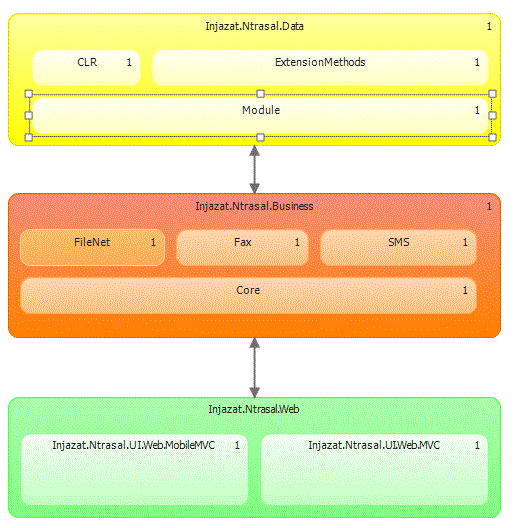
Injazat.Ntrasal.Data

Note: If for any reason Ntrasal will have more data sources, example filenet documents, or fax or other I prefer the following: (you can add a separate project or a folder inside Injazat.Ntrasal.Data)
• Ntrasal.Data.CLR (for any CLR functions)
• Ntrasal.Data.ExtensionMethods
• Ntrasal.Data.Modules (if you are using one LINQ or Entityframework no need for a folder)


Step 3: For business Layer
Add new project to the solution, select C#, Class library , name it as below:
Injazat.Ntrasal.Business

Note: Because im sure that NTrasal business will change in the future and it may cover a lot of area’s I prefer the following (add folders as below)
• Injazat.Ntrasal.Business.Core (general business here and basics)
• Injazat.Ntrasal.Business.FileNet
• Injazat.Ntrasal.Business.SMS
• Injazat.Ntrasal.Business.FAX

Step 4: Then add presentation layer
Currently for this example my presentation layer is only Web,
but be aware that in the future you may have more specific presentation layers as example 
Injazat.Ntrasal.UI.MVC
Injazat.Ntrasal.UI.Forms
Injazat.Ntrasal.UI.Mobile
Injazat.Ntrasal.UI.Mobile.BlackBerry (only if there are some spacifications)
Injazat.Ntrasal.UI.Mobile.iPhone
Injazat.Ntrasal.UI.VIP.Mobile

I will user the following
Injazat.Ntrasal.UI.Web.MobileMVC (this is the the mobile MVC)
Injazat.Ntrasal.UI.Web.MVC (this is for the normal PC Browser)

Step 5: Setting the references
Business will reference needed Data projects, and UI will reference needed Business layers. 

Step 6:Adding the Layer Diagram
Note: Even though I prefer to start first with this, we are doing it the other way around.
add to the same solution a new Modeling Project, I names it as below:
Injazat.Ntrasal.Architecture (I will use this project to store the layers diagram and any other UML I need or have example: Use cases, Sequence diagrams & etc.)

You can go to the  Architecture menu (you need to use Ultimate Edition of Visual Studio) and select new diagram, then select Layer Diagram.
Drag your artifacts(currently our project, folders) and set them on the layer diagram, set the dependences and change the colours, you may get something like the below:


Note: for more details you can refer to the MSDN link


Tuesday, June 19, 2012

WinRT Poster

After navigating the WinRT, I thought it will be a good idea to put the main namespaces all together in one poster. it looked helpfull as below:


For PDF file click here
For XPS file click here
For JPG file click here
For GIF file click here

Friday, May 25, 2012

Windows 8 - WinRT

Some of the Win8-Architecture diagrams for WinRT


Some other posters and diagrams
# Category Poster Name Web Site Download Other Preview
1 .Net 4.0 .NET Framework 4 Poster Web site download Deep Zoom
2 .Net 4.0 .NET Framework 4.0 Poster Web site download
3 .Net 3.5 The .NET Framework 3.5 Commonly Used Types and Namespaces poster Web site download XPS
4 .Net 4.0 .NET Framework and Visual Studio Roadmap Download Web site download
5 Key binding Visual Studio 2010 Key binding Web site C# VB C++ F#
6 Key binding Visual Studio 2008 Key binding Web site C# VB C++
7 Key binding Visual Studio 2005 Key binding Web site C# VB C++

Sunday, May 20, 2012

Kids Metro Studio

My first metro style windows 8 application, its still under development, and need some work. The idea is to give kids the capability to make very nice pictures by combining others and adding lines and text,
You can check & download the application from here.

This is build by using VS2011, C# & Xaml. the application uses touch for everything, drag a drop, change size with your fingers for your shapes or even rotate them. i added undo and redo capability with in application bar, off-course with camera support and loading from the disk

Im adding the capabilities for working in landscape,sniped,filled & portrait modes.

I didn't publish any code yet,  I want to participate in the contest for the metro style app, so may be after that. even though if you need any help on metro style c# & xaml I will be happy to help.

Sunday, May 13, 2012

Tech Out | Windows 8 App Lab

A great event in Dubai on Saturday Jun 9, 2012 , you can register for “Tech Out | Windows 8 App Lab “event   to build a Win 8 app in HTML5 and JavaScript  by the following link, and attendees may leave with a Windows Phone!  20 Windows Phones throughout the session to some very lucky developers.

Update, The event is on 9 June 2012, this is the updated date be aware. :)

What you must bring to participate:
•Your laptop installed with Windows 8 Consumer Preview and Visual Studio 11 Beta

There are limited seats so make sure you register to reserve your space!

SPREAD THE WORD!
Twitter #: w8labdxb


Sunday, January 15, 2012

Silverlight business line applications


I'm using Silver light 4.0, Silverlight toolkit, Entity Framework with RIA Services for Database. I will try to discuss applying themes, working with grid with buttons, opening popup window for editing data, in the popup we will have drop down list, autocomplete, normal controls & etc.
So let’s start, setting up your project and connecting to the data with RIA Service, is easy and straight forward ( a lot of articles is out there for that).
So you need to add a function or query to your domain services and start linking it with a data grid on the silver-light UI.
First I don’t believe in real world application that you will read only from one table and display data, there must be some joins and even some times some calculations.
So first we need to add our function, so where is the best location? I don’t prefer adding it directly to the domain file, it’s better to add a new one with partial class so if you needed to make some changes it want erase your customized functions.
My domain service file name is as follow: ABC_DomainService.cs
My Added functions will go to ABC_DomainService.Custom.cs, with same name space but a partial class as follow:
namespace ABC.Web
{
    public partial class ABC_DomainService
    {
….
Example of one:
public IQueryable<Item> GetItemsByModuleId(int ModuleId)
        {
            return this.ObjectContext.Items
                .Include("Capability").Include("UserResource")
                .Include("Lookup")
                .Where(c => c.ModuleId == ModuleId).OrderBy(c => c.ItemsId);
        }
So some notes on the above function, to have the include working you need to update the meta data file too. Mine is “ABC_DomainService.metadata.cs”, I go to the main data time in my case its “Items” and add the [Include] tag as follow:

            [Include]
            public Lookup Lookup { get; set; }
          
[Include]
            public UserResource UserResource { get; set; }

            [Include]
            public Nullable<int> OwnerUserId { get; set; }

 And if the type of the function is IQueryable, you will get it in Sliverlight (The client side code) as GetItemsByModuleIdQuery.
So Server side is ready let’s go to Client Side and consume it.
To display a data grid and have some data in it, I will use the DomainDataSource, put for the popup form we will do it by code. But let’s do it all, lets add paging, sorting, some query parameters and some filters too. Display info from related tables and so on.


        <sdk:DataGrid AutoGenerateColumns="False" Grid.Row="1" HorizontalAlignment="Stretch" Name="ItemsDataGrid" VerticalAlignment="Stretch"
                      HorizontalContentAlignment="Center" AlternatingRowBackground="#00D44444" Background="{x:Null}" BorderThickness="1"
             Height="Auto"         ItemsSource="{Binding Data, ElementName=domainDataSource1}"
…..
….
The most important thing is the ItemsSource, its binding  to our domainDataSource called DomainDataSource1.

A pager control to be displayed under the data grid
<sdk:DataPager Height="26" Name="dataPager1" PageSize="15" Grid.Row="2"
            Source="{Binding Data, ElementName=domainDataSource1}" DisplayMode="FirstLastPreviousNextNumeric" />


That’s it, very simple paging is complete. So lets go to the domainDataService1

<riaControls:DomainDataSource Name="domainDataSource1" LoadSize="15" QueryName="GetItemsByModuleTypeId"
                      AutoLoad="True" FilterOperator="Or">
            <riaControls:DomainDataSource.DomainContext>
                <domain:MRSDomainContext />
            riaControls:DomainDataSource.DomainContext>
            <riaControls:DomainDataSource.FilterDescriptors >
                <riaControls:FilterDescriptor
                PropertyPath="ItemName"
                Operator="Contains"
                Value="{Binding ElementName=SearchTextBox,Path=Text}" />
                <riaControls:FilterDescriptor
                PropertyPath="Number"
                Operator="Contains"
                Value="{Binding ElementName=SearchTextBox,Path=Text}" />
            riaControls:DomainDataSource.FilterDescriptors>
            <riaControls:DomainDataSource.QueryParameters>
                <riaControls:Parameter ParameterName="ModuleTypeLookupId" Value="38" />
            riaControls:DomainDataSource.QueryParameters>
        riaControls:DomainDataSource>

Notes:
My LoadSize is the same as my page size, so it will load once for each page.

A Reference to my DomainService need to be added and reference on the header of the page will be needed for that.
There is a two filters with an OR operation, in the domaindataservice body FilterOperator="Or", and add the filters in DomainDataSource.FilterDescriptors

I will try to post the reset if anybody is interested.

Wednesday, November 02, 2011

ASP.Net MVC4 BlackBerry Application


I tried MVC4 mobile templates for a blackberry application for my company, as a preview of the power of mobile apps, all our company employee have blackberry devices so, making use of some web Blackberry application essential.
First impression with the default template was it was very cool for if viewed on iPhone or android with large screen and high resolution colors with all the curves and style working, but for the blackberry it was not.

Plus the performance was horrible and very slow, different employees so different output (that was because the style sheet was still downloading).
With a very simple start up page containing only a small menu of 3 elements it took about 4-6 sec to load and that was not accepted. I was using the blackberry curve 9300.
So after some analysis, the Jquery and the style sheet are so big for these devices it was about 400K, so I started removing and cleaning, after stripping JQuery out and starting with a new style sheet from scratch, I got a good result with about 2Kb only, now my colleges accepted the performance that was less than a second for loading the pages, or at the max 2 sec for the pages that contain more data.
even if you say the first style is better on the device it was without the curves so a lot similar to the current one. you can check it here
Another problem raised to the surface and that was security, the application I was trying to expose this mobile new interface was on IIS with windows authentication that didn’t work with blackberry at all. So detecting the user and login him in the application was a new task, I didn’t like the idea of user name/pwd specific for the application or even to connect it with Active Directory. I needed something simpler and easy to use. The only Ideas I have are as follow:
·        Use simple user PIN code for each user
·        Use certificate on devices
·        Detect the IP, if its static identify user with it. (im working here ), and filtering by Browser Agent
or if there any other method !!
So until I manage the security part I think this project will be on the shelf for now. 
and i need to give this back to a graphic designer that will return the style to look good and to work good to. as below expected pages:-\


Tuesday, October 25, 2011

CityVille Popular Science Timed Goal Tips

I finished the mission in 2 minutes, but prepared for it one day before starting.

I was the worst in the timed missions, so this time I had some extra time to fix it. I have 4 time missions not yet started and decided to learn about them first and know how to get the bet result out of them,
For the City Ville Popular Science Timed Goal, and with some Google search, the requirements are:-

And all this for what ?
  • Gold Trophy: Solar Panel (gives you a 100 percent payout bonus to any buildings you place the Solar Panel next to).
  • Silver Trophy :50,000 coins .
  • Bronze Trophy:20,000 coins.
Its simple impossible to make if you start before you prepare, but if you prepare you can finish it after 2min of starting it, you get the highest reward, this is an advance mission so im expecting you to be an advance player too (have large and good CityVille), no need for extra space, no need to build one house.

In short summary:
• Collect from an Observatory Twice
--Have two of them ready to collect before starting 
• Increase your Population by 5,000
--Store several high population houses in your storage that will cover 5000 population and when you start    the mission return them to their original location 
 • Have 10,000 Goods
--Have the needed goods storage for that, and fill it with goods before starting the mission.  

First Requirement: Collect from an Observatory Twice 
Before you start your mission check that you have a Observatory and its ready to collect, it will be ready again after 24 hours, I have two of these so I will wait until both are ready to collect and when Im ready to start this will be simple task. If you have one, ok no problem you will finish in one day (collect first time and wait 24 hours and collect again), or you can build the another ,completed and wait until its ready to collect.

Second Requirement: Increase your Population by 5,000 
I started first by some calculation, I will need about 625K$ to build 25 units of housing that have a population of 200 to make the 5000 goal , the energy too so or even the extra space need !!!!!!, but I found a very good tip and that is , you can use your storage for these time goals, you simple store what you have of the largest population building in the storage, your population will go down (lookout you will lose ready collected from the house, very small I don’t care.) after going down for more than 5000 you are ready to start the mission considering the population requirement. So when you start the mission, you only need to empty your storage by returning your housed to their original location. I used about 20 Big kahuna bungalow housed that had a population of 200-280

Third and last requirement: Have 10,000 Goods 
This is easy, I have a storage of about 16K, so I filled it before starting the mission. If you don’t have that storage yet, prepare for it, build some goods storage units and seed your farm for that goal, don’t start if you don’t have 10,000 or more in storage.

So enjoy bouns payout of your businesses and homes by 100 percent? after getting the Gold Trophy Solar Panel

Thursday, August 18, 2011

Empires & Allies Advance Game Tip

 This is for the people who are at level 55 and don’t have anything to do before leaving the game this may be the last fun part the game can provide. You will need a lot of money & a lot off industry factories level 3

The idea is simply :-
Provide A Full Time Market Service
To start do the following:
1.     Use the maximum production option available,
This will take 3 days but don’t worry about time now.

2.     Go to all your friends and start buying all the goods.
A long and boring step but you will need to do it.

3.     Later put all the goods in your markets for sail.


Optimize your selling strategy by doing the following:
1.     Have (or build) at least 7 markets
5 for the ore productions (Iron, Gold, Aluminum, Uranium and Cupper) and one for Wood and another for Oil, if you like add more to sell military this will help too.
2.     Group your market in one place so all the goods are checked
3.     Put all your Markets in the Center, the first location the visitors can see.
4.     Make some market surrounding so it can be easily and instantly checked by your visitors. use empty space or some decorations to make the all the markets more visible
5.     Always try to have huge amount of goods in your market
If you have huge amounts of goods your friends will come back to you whenever they need anything

6.     Put all your money in the market, put don’t dry yourself leave about 50K-100K, for building and playing
7.     Use all the available space for industry production
8.     Put your Ground and Air units in the inventory don’t waste land for that.
9.     Remove all unnecessary decorations, including the roads and mission required decorations after your complete them.
10.   Increase Oil, Wood & whatever Ore production you have, done waist a lot of land for farms; they are not so good on the long run.
Simply everybody now will can come to your island and buy anything they need, so they will visit your market and in the process the visitors will try to gain one-energy by doing 5 simple clicks on anything worthy.

And if they do that you got there 5 clicks for life whenever they play. And your production time will drop.
Even if they don’t buy anything on their first visit they will remember that your island had a huge market off goods and they will come back.

Be aware that Wood is very high in demand so leave a bunch of Wood to refill your market, each time I come back to my market the wood is gone, I will need to increase my Wood industry even though I have a lot of them.

That’s it, you’re at the correct track after the money comes in with huge numbers build your huge fleet and invade everybody and be the largest emperor in Empire and Allies.